
 Minecraft
 Hytale
 Discord Bot Hosting
 Minecraft Hosting
 Hytale Hosting
How to Install Geyser and Floodgate on a Minecraft Server (2026)
Learn how to install Geyser and Floodgate on your Minecraft server in 2026. Enable Bedrock and Java crossplay with this step-by-step tutorial.

Installing Geyser and Floodgate is possibly one of the best ways to grow your public Minecraft server in 2026. It allows players from Minecraft: Bedrock Edition to join your Minecraft Java server, broadening your player base.
In this guide, we will be going over how to install Geyser on your Minecraft server as well as setting up Floodgate for the best player experience.
This guide works for Minecraft 1.21+ and most recent Paper, Purpur and Spigot servers.
Installing Geyser and Floodgate on Minecraft: everything you need to know
You will need 2 server ports when using GeyserMC on your Minecraft server. One server port will be used for Minecraft Bedrock players to join, while the other port will be used for Java players. However, SodiumNodes’ Minecraft hosting plans offer this feature.
You may also notice slightly broken combat between the two versions.
Step 1: Installing the Minecraft plugin
To start, we will need to install the Minecraft plugins Geyser and Floodgate.
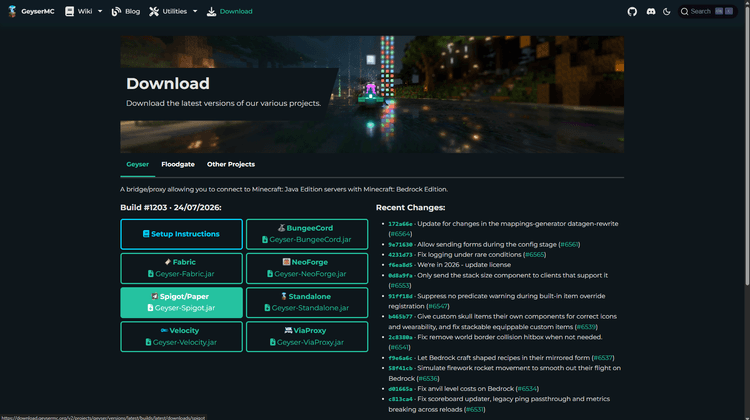
Stop your Minecraft server, head over to the GeyserMC downloads and select your Minecraft software.

We will be using Spigot/Paper in this tutorial.
Upload the Minecraft plugin to your plugins folder.

Start your Minecraft server again to ensure all plugin configuration files are successfully created by GeyserMC. You should see a folder for the Geyser plugin, and once you do, stop your server again.
Repeat the following steps for Floodgate and start your Minecraft Java server.
Head over to your Minecraft server in the panel again, and navigate to Network. From here, you will need to create a new port allocation.

Once you create your allocation, it should look something like this:

Head back to your Geyser configuration and in the bedrock section of the configuration, change the port to your secondary port. Inside the java section, change auth-type to floodgate. This allows Minecraft Bedrock players to join without requiring a Minecraft Java account. Finally, save your changes.

Once you’ve saved your changes, the last thing we need to do is change two settings in the server.properties file. We will need to disable enforce-secure-profile and online-mode. This ensures authentication will be handled by Floodgate instead of the Minecraft server’s built-in authentication.
Go back to your root directory, navigate to server.properties, and change the settings accordingly.

Finally, save changes, and you can start your Minecraft server.
The connection address for your Minecraft Bedrock server will be the following:
- Address: your normal provider’s IP address or subdomain.
- Port: the secondary port in the panel.
The Minecraft Java connection details will not change.
Congratulations! The Floodgate and GeyserMC setup should now be complete, and Minecraft Java and Bedrock players should be able to join your Minecraft server.
If you’re looking for a Minecraft server hosting provider in 2026, check out SodiumNodes. We sell servers for around €1/GB and give you AMD Ryzen CPUs with DDoS protection.
Try our AMD Ryzen Minecraft hosting
FAQ
Do I need Floodgate for Geyser?
Floodgate is a great addition to your GeyserMC server, since it helps Minecraft Bedrock players without a Minecraft Java account to connect to your server. However, it is not a requirement for Geyser.
Does Geyser support cracked servers?
Yes. GeyserMC supports cracked Minecraft servers.
Can Java and Bedrock players play together?
Minecraft Java and Bedrock players can play together by setting up GeyserMC on the Minecraft server.
Does Geyser work on Fabric?
Yes. GeyserMC supports Bungeecord, Fabric, NeoForge, Spigot, Paper, and Velocity.
Does Geyser increase RAM usage?
Yes. GeyserMC may increase your Minecraft server’s RAM usage just like any other plugin or mod.
Your Minecraft server, ready in seconds.
Why wait any longer?
With SodiumNodes, your server is deployed is 60 seconds away from being yours.
DDoS protection: Stay online during raid attacks.
AMD CPUs: No lag, even with several mods or plugins.
Custom Mod Support: Run Fabric, Forge, or Paper mods/plugins.
Friendly customer support: Real answers in under 10 minutes.