
 Minecraft
 Hytale
 Discord Bot Hosting
 Minecraft Hosting
 Hytale Hosting
LuckPerms Minecraft Guide: Create Ranks, Permissions & Groups (2026)
Learn how to install and configure LuckPerms on a Minecraft server, create groups and tracks, use the web editor, and set up MySQL storage.

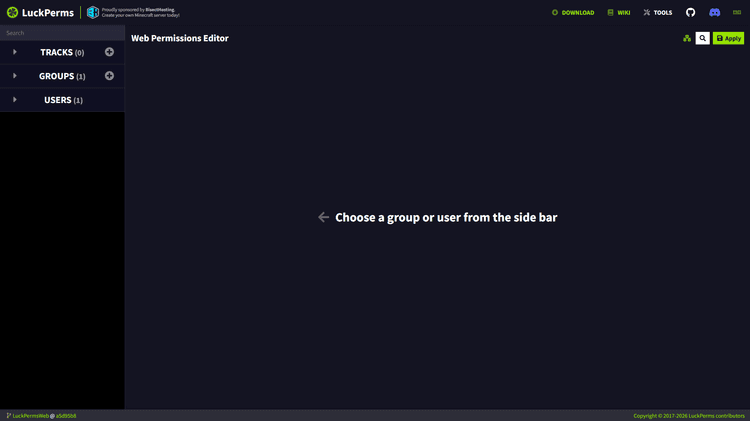
LuckPerms is one of the most popular and powerful plugins for managing permissions on Minecraft servers. Its web editor makes it easy to configure groups, permissions, prefixes, suffixes, and tracks without relying entirely on commands.
Overview of LuckPerms commands
Here is a list of commands you can use in your Minecraft server to change your LuckPerms settings:
| Command | Description |
| /lp editor | Open the LuckPerms web editor |
| /lp group <group> setdisplayname <name> | Set a display name for the group |
| /lp user <player> showtracks | Show tracks assigned to the player |
| /lp user <player> parent add <group> | Add a player to a group |
| /lp user <player> parent remove <group> | Remove a group |
| /lp user <player> info | View user information |
| /lp group <group> permission set <node> true | Add a permission |
| /lp sync | Synchronise data from storage |
What is LuckPerms?
LuckPerms is an advanced permission manager for Minecraft. With its broad compatibility with Bukkit, Spigot, Paper, Purpur, Fabric and Forge and its easy web interface and simple commands, the Minecraft plugin receives thousands of downloads every month, making it the most popular plugin and mod for Minecraft servers to integrate permissions.
What are LuckPerms groups?
LuckPerms groups, more commonly known as ranks, are collections of permissions assigned to multiple players at once. These permissions can set a display name, prefix, and suffix when the group is assigned to a player.
What are LuckPerms tracks?
In LuckPerms, tracks define the order of groups. This allows players to be promoted or demoted through a predefined scale.
For example, Helper is below Moderator, which is below Administrator, which is below Owner. This creates a scale; Helper → Moderator → Administrator → Owner.
This scale can be used to promote and demote players using the following command: /luckperms user <player> promote <track>.
In other words, tracks are the order of certain ranks (also groups) in LuckPerms.
Now that we went over the most essential components of LuckPerms, we can proceed to installing the Minecraft mod/plugin.
How to install LuckPerms on a Minecraft server
The first step is to understand whether your Minecraft server uses mods or plugins, which depends entirely on your Minecraft server software. See Spigot vs Paper vs Purpur vs Forge: Which Should You Use in 2026? for better context on this topic.
In this example, we will be installing LuckPerms on a Spigot server.
SodiumNodes makes installing Minecraft plugins simple: all you need to do is go to the “Plugins” section in the panel, and search for the Minecraft plugin you need.
It is completely secure, as it gets the search results directly from Modrinth and SpigotMC. See how to install a Minecraft plugin on SodiumNodes.
How to configure LuckPerms using the web editor
LuckPerms’ web editor simplifies the process by avoiding commands and presenting an easy-to-use web interface.

From here, you can easily create groups, tracks, and player-specific permissions, which can be useful for certain trusted administrators to always have the permission to run /op.
How to create groups in LuckPerms
To create groups, go over to the sidebar and click the “+” sign.

You will be presented with a form, which is where everything might seem overwhelming for beginners, but it’s much simpler to configure than it looks.

- Group name: all lowercase letters. This is the identifier for the group that might be useful when using commands. I will be using
adminas an example. - Display name: What the rank should look like on certain places like scoreboards. You can add custom colours like bcc0b (use an
&followed by a colour in hex format) and you can add any characters you want. - Weight: the priority of the group. You can safely leave it at 0 if you don’t know what you’re doing.
- Prefix: If you’re using a chat formatter plugin and Vault, it can display the prefix next to the player’s display name. For example, if you set it to
&8[bcc0bAdministrator&8] &r, the player’s display name may look similar to this: [Administrator] LookedRobob - Suffix: Similar to prefix, except it appears after the username instead of before it.
Once you’ve saved these settings, it’s a good habit to test your configuration.
To do this, simply expand the “Users” section and click on your username

and the page should look like this.

Where it says “Inheritance”, you can click on it and change the permission from group.default to group.<name>, which in our case would be group.admin.

Simply apply your changes, and if it asks to run a command like /lp applyedits ... then simply copy it and paste it into your server console.
If everything is set up properly, you’ll be able to see your prefix in the chat:

How to create tracks in LuckPerms
Tracks are probably the most underrated feature LuckPerms has to offer.
Similar to what we did before, click the “+” sign near “Tracks” and you will be prompted to fill in a form.

Here you can add your groups and assign a name to your track. We’ll be using general as a simple example.
Proceed to ordering your groups and click “Add track”.

After making changes in the editor, LuckPerms might generate an /lp applyedits command that applies those changes to your server.
LuckPerms MySQL database setup (recommended)
If your plan supports it, we strongly recommend you use a MySQL database for your LuckPerms data.
Reasons to use MySQL over H2:
- Convenience: ability to share ranks across multiple servers;
- Scalability: MySQL is better suited for larger servers and networks, especially when multiple Minecraft servers share the same permissions database.
- Backups: you can easily download backups of your MySQL database through an admin interface on SodiumNodes.
SodiumNodes allows you to create a MySQL database, making it a great choice for SMP servers. Plans cost around €1/GB, which makes them very affordable for someone on a strict budget.
Anyway, go ahead and create a database by navigating over to “Databases”,

click “New Database”,

and fill in the Database Name field with your Minecraft server name so it’s easy to remember.

Click Create Database and then your MySQL database should be created.
Go to your config.yml for LuckPerms, and first thing set storage-method to mysql.

Next, fill in each detail with your MySQL connection details.

Once you’ve done this, simply click “Save Content” and restart your server from the “Console” tab.
Done! Now LuckPerms should be configured to use MySQL.
Conclusion
If you need to set up ranks (groups) in your Minecraft server or SMP, LuckPerms can handle it easily by giving you a convenient web interface, making it the easiest and most popular permissions plugin on the market. Because of this, it is essential to understand its configuration as a Minecraft server administrator.
Can I use LuckPerms without Vault?
Yes. Although LuckPerms can be used without Vault, prefixes assigned to ranks won’t show up in the chat as that functionality requires it.
What software does LuckPerms support?
LuckPerms supports Paper, Spigot, Bukkit, Purpur, Fabric, Forge, NeoForge, and Velocity.
Is LuckPerms free?
Yes. LuckPerms is open-source and completely free to use.
Should I use LuckPerms with MySQL?
If you’re running a Minecraft network with multiple servers or prioritise performance, scalability, and backups, then MySQL should be used with LuckPerms. Minecraft hosting like SodiumNodes provides MySQL databases.
What does the LuckPerms plugin do?
LuckPerms is a Minecraft plugin that allows administrators to set up group-specific permissions using a simple web interface, avoiding the complexity of YAML configurations.
Your Minecraft server, ready in seconds.
Why wait any longer?
With SodiumNodes, your server is deployed is 60 seconds away from being yours.
DDoS protection: Stay online during raid attacks.
AMD CPUs: No lag, even with several mods or plugins.
Custom Mod Support: Run Fabric, Forge, or Paper mods/plugins.
Friendly customer support: Real answers in under 10 minutes.